04 March 2007

Online Newspapers Remove Compulsory Registration

More and more news websites are asking visitors to register to read online content. Some sites like The Washington Post and The New York Times require just an email-address while The Wall Street Journal charges a monthly fee from users.

Should news websites remove mandatory registration ? Will this move draw more web traffic to their websites ? That's precisely the question from one of my blog friends, a journalist with a popular print newspaper:
Currently our site has compulsory registration [free]. I have been recommending [to management] they remove the registration requirement.

By what percentage do you think traffic will improve if we were to remove registration? They are willing to remove registration if we are going to enjoy 35-40% spurt in traffic.
My personal opinion is that mandatory registration is a bad idea. Here are some reasons:

» The main purpose of registration is to get an idea about the profile of your site readers like what's their income group, age, interests, etc. Is anyone honest while filling those long registration forms ? If not, what's the point in collecting junk data.

» BugMeNot is still alive and kicking.

» A key factor in good search rankings is inbound links. If your news article is wrapped with a registration barrier, very few people will link which will ultimately effect your site's ranking in search results. Less visitors (or lesser page views) will translate into lower advertising income.

According to Google, 200,000 webpages are linking to CNN.com but the WSJ has around 45,000 inbound links - CNN is way high partly because their content is accessible without registration.

Online publishers may go for an "optional registration" model - every visitor be allowed to read the news stories (including those in the archives) but if they register, they get access to some goodies like email newsletters, real-time alerts, personalized news sections, ability to track news based on keywords, etc.

And if you ever need reader demographics, just run a simple contest with some great prizes like Apple iPods.

10 February 2007

Dealing With Website Plagiarism: When Someone Copies Your Blog Content ?

What should you do when someone copies an article from your blog or steals your website graphics without permission ?

Recently a "clever website thief" registered a new web domain www.labnol.com [dangerous website, please do not visit] and created a mirror copy of this blog including the site design. All the blog articles and reader comments were copied verbatim without any attribution or acknowledgment.

The guy was definitely an intelligent geek because the scripts he wrote were continuously monitoring the contents of this site and any changes here were reflected almost immediately on his site.

Thanks to some excellent suggestions from Darren Rowse (a blogger par excellence) and DigitalPoint members, that site is now offline. I am sharing various approaches that helped me in pursuing the matter and the lessons I learnt during my interactions with the spammer and hosting company.

How to be a detective and find if someone is copying my content ?

Try to find a sentence in your articles that either has a spelling error or formed using a unique combination of words that people haven't used before. Search for that sentence enclosed in quotes on Google Blog Search and Yahoo Search (it indexes fresh content quickly than Google).

You found a copy of your blog article on another site. How can you get it removed ?

The easiest approach will to send a polite email to the blogger requesting him to remove the article from his blog. The email of the blogger is generally available on the blog itself. If you can't get hold of the email, drop a comment in any of his blog posts. Most bloggers generally read user comments.

Sending an email didn't help - the copy-paste blogger refused to comply

Don't be surprised if the blogger starts accusing you of copying his content. That actually happened with me. At this stage, there's no point in communicating further with the offender - you must now get in touch with his web hosting company.

How should I complain to the web hosting company ?

Run a WhoIs lookup (whois.net/)on the web domain name to find the domain registrar and the name of the web hosting company. Here's a sample whois record:

In the above case, brinkster.com is hosting the copyright content. Most web hosting companies are very strict in these matters and will almost immediately respond to complaints. Visit the corporate website of the web host and look for the section that says "Contact Us". Here you will find the email address (abuse@name.com or support@name.com) where you have to formally send your complaint.

What should I write in my complaint letter to the web host?

This is the toughest part - Your job is now to convince another person that you are the original owner of a particular content. Hence, you must submit as many proofs as possible to prove that you actually own the content. Here are some useful pointers:

» Provide a link of the Google Cache to prove that Google spiders discovered your content earlier.

» If you are site is mentioned in the Web archives (archives.org), share that information with the web host.

» Inform them about the Google Page Rank of your site - a site which indulges in copyright violations is generally a new site with no or a low pagerank.

» Share you Technorati Rank to prove that you are a popular blogger and thousands of sites are linking to your content. That may put the ball in your court.

» Share your Alexa Ranking and Traffic details to confirm the age of your site.

» Send the Google search results for link:labnol.blogspot.com to prove how may sites are actually linking to you.

There are just some example which should be sufficient to convince the web host. If the web host fails to act, move on the next step.

Instruct Search Engines to Remove that Duplicate Content Site from their Search Indices

Google, Yahoo and other search engines accept user complaints for getting search listing removed if the site violates copyright laws. Once the offending site is removed from search engines, the traffic would collapse and even his motivation to steal content. Bored and frustrated, he may himself take his site offline. Go ahead and file a DMCA complaint with search engines - it's equivalent to a Cease & Dessist Notice.

Everything else fails - Complain to the Site Advertisers

In most circumstances, the thief will be planning to monetize your content using advertising from Google Adsense or Yahoo Publisher Network or some other service. Once he sets up advertising on his site, your job get even easier - just complain to them and immediately, the ads will be pulled off from the offending site.

How to Open Password Protected PDF Documents

Removing PDF Password RestrictionsThere are sometimes genuine reasons to unlock or crack a password protected PDF file. You have the legal right to open the encrypted PDF document but forgot the password like in the case below.

Say one of your former colleague created some critical sales reports in PDF format but he is not working with the company anymore. In his absence, you have no option but to crack the PDF password in order to open, read or print these PDF files.

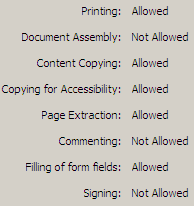
There are basically two types of PDF protection - the original PDF creator can either restrict opening the PDF file itself or he can restrict others from modifying, printing or copying text and graphics from the PDF file. Here are a few possible workarounds:

When there are Copying or Printing Restrictions..

Say you want to print a couple of pages from the PDF document but the document settings won't let you do that.

Open the document in Acrobat Reader or Foxit and capture the PDF page as an image using any free screen capture software. If there are multiple pages, you may try SnagIt since it can autoscroll and capture multiple pages of the document in one-go.

Alternatively, you can invest in commercial solutions like Advanced PDF Password Recovery from ElcomSoft and PDF Password Remover from Very PDF.

(These utilities may not recover the password for you - they'll just remove the restrictions from the password protected file)

When there are Document Opening Restrictions..

This is a very tricky case and there's no straight-forward solution to read PDF documents that are password-protected at the Open level.

The software will use methods like Brute Force, Key Search and Dictionary Attack to guess the password. They will try to use all possible character combinations as the password and so the process might take hours or even days and would really depend on your computer's processing power.


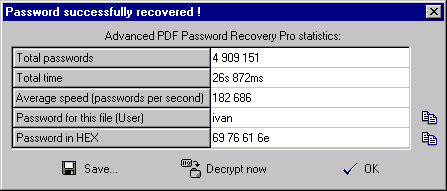
Advanced PDF Password Recovery Professional edition from ElcomSoft is a recommended option. When (if) the password is found, the program shows it, as well as the number of passwords which have been tested, and the program speed.

Legal Issues: - you maybe surprised to learn that these PDF password cracking software are absolutely legal and Microsoft even awarded ElcomSoft a Gold Certified Partner status.

09 February 2007

Convert Email Messages or Word Documents to PDF Online using Google Docs

Here's a very simple way to create PDF files online without buying expensive PDF tools or installing any virtual PDF printer drivers. The output PDF file will look exactly like your source document preserving all the text formatting, hyperlinks, tables and even embedded images.

We'll use a feature in the just introduced Google Docs & Spreadsheets Suite that lets you create new online documents by emailing them directly to a secret email address. The documents can be sent as an email attachment or even as a rich text email.

Here's a step by step approach to creating PDF file from your rich-text email messages or a Word document using Google Docs [support for spreadsheets is expected soon]

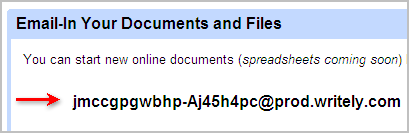
Step 1: Assuming you already have a Google Account, get your unique email address here where you'll be sending the documents. [under Email-In Your Documents or Files]


Step 2: Using GMail, Outlook or any other email service, compose a new email message. Either attach your Word document or create a rich-text email message. Send this email to the address you copied in step 1.


Step 3: You will soon receive an email message back from Google Writely containing a link to your document on the Google Docs server. Open the document inside Google Docs.

You can also edit the document inside Google Docs in either HTML mode or the Rich-text mode itself. Don't forget to save your changes.

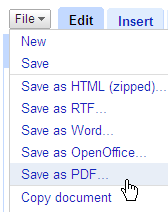
Step 4: This is the last step - click the Google Docs File menu and choose Save as PDF. Select any folder on the hard drive and your PDF is ready.

The whole process takes less than a minute.

Quick Tip: You can also use the Google Docs email-in feature to upload more than one document in a single email message.

Add Language Translation Flags To Your Blog in One Easy Step; Reach Non-English Speaking Readers

What's you first reaction when you land on a website that's written in Russian, Chinese or Japanese ? Most of us would hunt for that English language translation flag and if that's missing, we will copy-paste the site address in Google Translate website or Yahoo Babelfish to convert the site content to English.

Way too much effort. Now let's reverse the roles and say somebody from China or Japan visits your blog (written in English). The foreign visitor will have exactly the same problems that you faced when you were visiting that non-English website above.

Since more than 65% of web users speak a language other than English, it is essential that you provide language translation features in your blog so that you don't miss the non-English speaking traffic.

So when an Arabic visitor passes your English blog, he or she can just click the Arab flag to translate the website into his native language - That way you don't loose a visitor plus he could even subscribe if the content is good even if written in another language.

Here's a quick tutorial to add language translation to your blog. You can be any blogging platform including Blogger, Typepad, Wordpress that provides access to templates. The visitor will see nine country flags corresponding to German, Chinese, Japanese, Korean, Arabic, French, Portuguese, Spanish and Italian languages.

All you have to do is copy-paste the following lines of Javascript code anywhere in your blog template.


Actually the above tutorial was a bit out of date since Yahoo acquired Babelfish and WorldLingo changed their translation URLs.

Though the machine translation powered by Systran is generally not as correct as the service offered by professional translators, not all of us can afford an human powered translation. Plus the non-English visitor can alway connect the dots and make some meaningful sense of your content.

There's no translation support for Urdu, Russian, Hindi, Telugu or other Indian languages.

Add Language Translation to your Website - Tutorial

How to make foreign visitors love your website even if they don't understand your language ? Add Language Translation to website and blogs - This is a simple Step by step guide to provide instant language translation in your website. Your site visitors can translate any webpage by clicking on the corresponding country flag and read your website in their native language.

Machine translation in blogs or websites is probably the easiest way of helping readers from different countries communicate. Even if a blogger writes in Spanish and a reader speaks English, or vice versa, both of them can still understand each other.

Today, people are blogging in multiple languages to create a conversation with readers outside the English Speaking blogosphere. Free language translation tools let bloggers post messages simultaneously in English, German, French, Spanish and other languages.

The most popular free Web-based language translation tools are offered by Google, AltaVista Babelfish and WorldLingo. Using these services, web audiences who speak English, French, Spanish, German, Italian, Portuguese, Dutch, Greek, Chinese (Traditional and Simplified), Japanese, Korean or Russian will be able to translate websites into their native language.

With over 65% of web users speaking a language other than English, providing the means of translating websites with English content to another language is very essential. Your multilingual website becomes more accessible and popular if users can translate your website content into their native language.

There are two methods to let your visitors easily translate your website:

Altavista BabelfishMethod ONE: All these services provide a translation box. To translate a webpage, you simply type in the URL of the website, choose the source and target language, and click the Translate button. [World Lingo, Google Translate, BabelFish Translate]

Method TWO: Here we will integrate the translation form in the website itself without requiring the user to visit any external page for translation. Your web visitors will be able to translate foreign language content into their native language by simply clicking the country flag icon. (Notice the top right corner of this page to see the various country flag icons). Simply cut and paste the code into your pages.

1. Alta Vista Babel Fish:
Babel Fish Translate is available in English, German, Spanish, French, Italian and Portuguese. Just add the following single line of JavaScript code to your website.


2. Google Translate: Available in English, German, Spanish, French, Italian, Portuguese, Japanese, Korean and Chinese (Simplified). Remember to replace the value of variable "u" with the URL of your website. The translated pages can even be bookmarked.


3. WorldLingo URL Translator: World Lingo is my favorite service since Google indexes the static URLs translated by World Lingo. Thus, my website can be found on Google even while searching for non-english terms. World Lingo supports English, French, Spanish, German, Italian, Portuguese, Dutch, Greek, Chinese (Traditional and Simplified), Japanese, Korean and Russian. The translated pages can even be bookmarked.


The above World Lingo Translation Code is customized for the Blogger Template. Since I have added translation to every page on my weblog, I have used wl_url=<$BlogItemPermalinkUrl$> in the URL. You will need to change this if your blog is hosted on another service like Typepad or Wordpress.

The <$BlogItemPermalinkUrl$> tag should be wrapped inside the tags.

These techniques can be applied for translating websites to English, German, Spanish, French, Italian, Japanese, Korean, Dutch, Portuguese, Russian, Traditional Chinese and Simplified Chinese. Translation Support for Middle Eastern languages like Arabic, Urdu, Farsi, Persian, scripts like Hindi, Sanskrit, Telugu, Punjabi, Marathi, Konkani scripts are provided by professional translating services only.

A 20" LCD Screen vs a 20" CRT Monitor - Which is Bigger ?

As kids, we are often asked what would weigh more - a kilogram of cotton roll or a kilogram of stone - as you probably guessed, both would weigh the same.

The same logic may not apply to display sizes of computer screens. The viewable area of a 17" LCD monitor is not the same as that of a 17" CRT monitor or a 17" TV screen - it is generally much larger.


That's because the LCD screens are measured in a different way than CRT screens.

Though both screens are measured diagonally, the plastic case surrounding the monitor screen is included in the measurement for the CRT. Therefore, the actual viewable area is at least an inch less than the stated size of the screen.

LCD Display size refer to the actual screen dimensions or the viewable area and do not include the plastic edges.

Now you know why that 15.4" laptop screen looks about the same size as your old 17" CRT Monitor.
Source: Dell Support

Create a Movie of your Powerpoint Presentations with PPT To Video Scout

convert ppt to video avi PPT To Video Scout is a Windows-only software to convert Powerpoint PPT presentations into AVI or MPEG Video files which you can later burn to a DVD or a VCD.

Though PPT To Video Scout is a commercial software, you can get it absolutely free (no strings attached) as part of the "Giveaway of the Day" project.

To convert your PPT slides into video, you will need to have a copy of Microsoft Powerpoint installed on your machine since the software can only run from the "Convert To AVI" command in Powerpoint File menu. No stand-alone version.

But hurry up - you should download and install the software today itself (Feb 9, 2007) else the offer expires. Check the readme.txt for instructions.

Download PPT To Video Scout

GiveAway of the Day

Home Delivery of e-Mail Messages via Snail Mail


Imagine sending an email to someone residing in a remote village who has never heard about computers or internet and there's not even an electricity connection in the house.

That's where ePost, a service of the Indian Postal Department, fits in. You can still reach that person via email.

Here's how the ePost service works - you send an email to ePost with the postal address of the recipient. The email message is then forwarded to the nearest Post office where it is printed, enveloped and delivered by the postman like other snail mail.


You can also send handwritten message through this service - walk into your nearest post office where the letter will be scanned as an image and transmitted through e-mail.

All this at a cost of ~20¢ per page per addressee. And the undelivered messages are physically returned to the sender by snail mail.

Now a company in Germany have taken that concept a step further - in addition to emails, they even deliver SMS text messages and printed copies of documents using the old-school postal system. This postman delivers email

Like ePost, you type the message online or upload a document, make the payment and PixelLetter will then print, fold and envelope your letter and deliver it the old fashioned way. Europe only.


The glorious days of the good-old postman are back again.

Want to Turn Google Talk Into an Internet Radio Station Without Any Software? Play Live Music right from your PC

I want to stand with you on a mountain.
I want to bathe with you in the sea.
I want to lay like this forever.
Until the sky falls down on me...
[Truly Madly Deeply by Savage Garden]

You guessed it right, this post is all about playing live music for your valentine (and friends) using Google Talk, Skype, Yahoo Messenger and other IM software.

With this trick, you should be able to do the following:

1. Play that huge song collection on your local computer using any media player like iTunes or Windows Media player and stream that music live to your IM buddies.

2. Send MP3 songs as voicemail to any of your contacts in GTalk that they can download as MP3 or directly play via the Google MP3 Player in GMail.

3. Dedicate a music video on Youtube to your valentine and it will stream live to her computer as audio via Google Talk.

The trick is to change your sound settings and set the recording device from Microphone to Stereo mix (or Wave Out Mix) as illustrated below:


1. Click that volume icon on your Windows system tray. Goto Options -> Properties and choose the appropriate mixing device from the drop down (it's Sigma Tel C-Major Audio in my case)

2. Now select "Adjust volume for Recording" and click the OK button. On the next screen tick the check box next to Stereo Mix (deselect the Microphone check box if it's selected).

That's it. Now start iTunes or open your favorite video on Youtube or any video sharing site.

Click on the GTalk contact who you want to dedicate that song to and click Call. Simultaneously hit the play button in your media player.

To send the song as a voicemail, click "Send Voicemail" in the Gtalk message box.
Google

See other Related Posts below